The Timer Cube on My Desk
A small flip timer that sits right in front of me on the desk. How a dedicated physical cube broke my habit of losing hours to micro-distractions.
Contents
Before this cube landed on my desk, I never used a timer to focus.
When I had work to do, I sat down and started. No Pomodoro app, no countdown in a pinned browser tab. I worked for as long as I could and didn't pay much attention to the clock.
On good days that was fine. On normal days it had a big blind spot.
Whenever the work stalled for a bit (a build taking twenty minutes, a test suite running, or a moment where I wasn't sure how to structure the next thought), my mind went looking for an escape. My hand would reach for the phone on the desk, and the next thing I knew I was twenty minutes deep into Instagram or X (Twitter) or LinkedIn. Yeah, I will doomscroll even in LinkedIn as well.
With no timer and no structure, nothing pulled me back. The scrolling ran on autopilot until I looked at the clock and realized a chunk of the afternoon was gone.
You might ask: why not just use the timer on my phone, or keep a browser countdown open?
I never tried either, because both looked broken from the start. Unlocking my phone to set a 25-minute countdown means walking straight into the thing I'm trying to avoid. The moment the screen lights up, notifications and app badges are already asking for attention. A browser timer is just another tab, and it gets buried behind my code editor, terminal, and docs within a minute. Out of sight, out of mind.
A few weeks ago I bought a small matte black timer cube and put it right under my monitor. It changed the way I work.
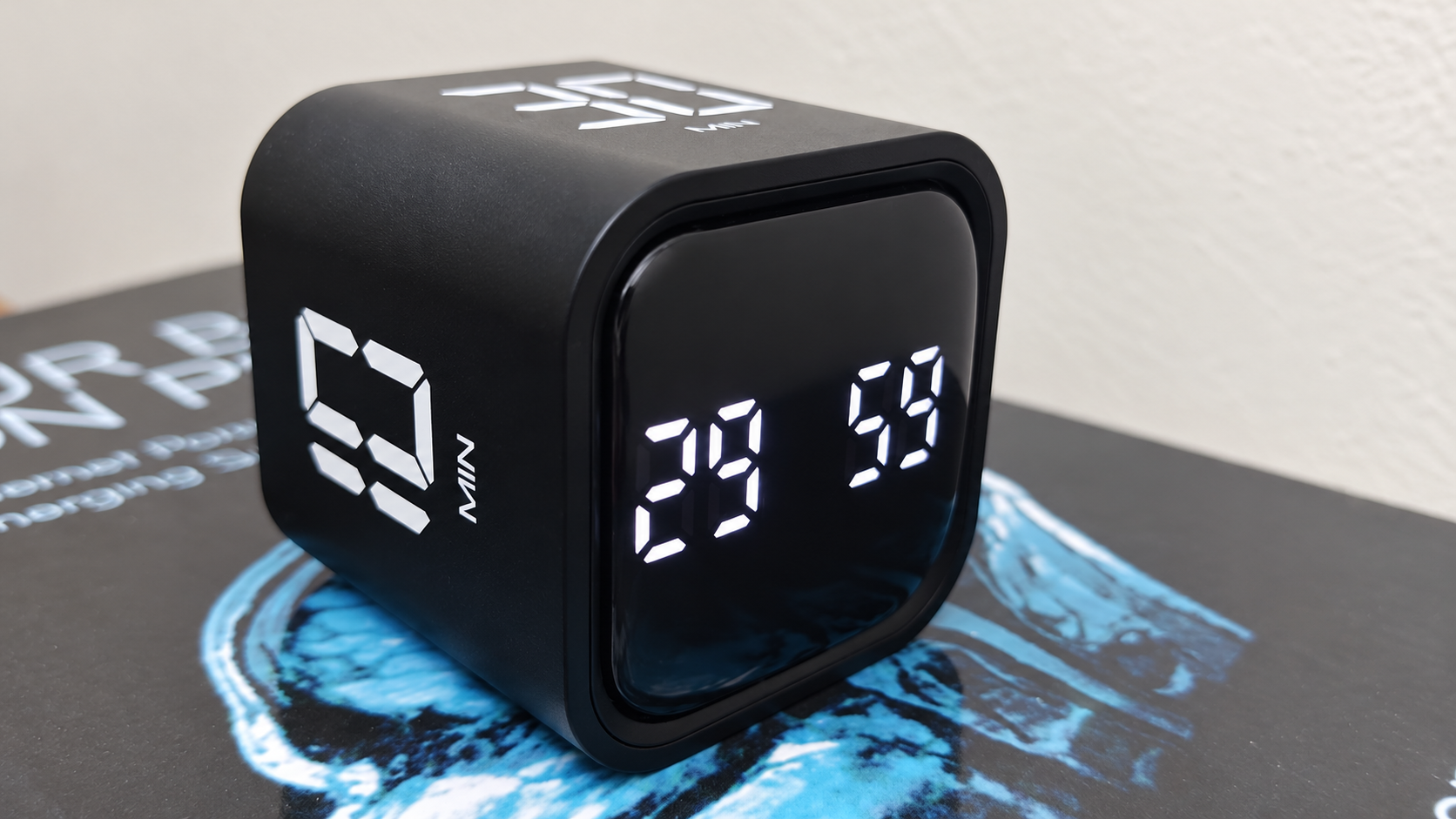
How it works: just flip it
The cube has two modes: Manual and Gravity.
In manual mode, you use the buttons on the back to set any minutes and seconds you want, like a normal digital timer. To be honest, manual mode isn't why anyone buys one of these. Gravity mode is.
Four preset times are printed on its sides in bold white numerals: 5, 10, 30, and 60 minutes.
Whichever face points up becomes the countdown. There are no buttons to press, no phone to pair, and no menus. If I want a 30-minute sprint, I roll the cube so the "30" faces up, and the LED screen on the front starts counting down from 30:00.
The rest of the controls are physical too:
- Pause: flip the cube so the screen points straight up. The timer freezes on the current second.
- Resume: tip it back onto its side and the countdown picks up where it left off.
- Switch or reset: flip it to a different face.
A switch on the cube picks the alert: vibration or sound. There's no silent option, so it's either a buzz or a beep. I almost always leave it on sound, so when a session ends I get a short, clear beep.
Why a cube works better than a screen
It sounds like just another gadget, but a separate physical object does something software can't.
A phone is built to distract you. When you pick it up to check how much time is left, you're holding a device that thousands of engineers designed to hold your attention. The cube has no notifications, no feed, and no inbox. It does one job.
A timer on the computer gets lost. On a monitor it's a few pixels competing with a dozen open windows. It ends up behind the code editor, under the docs, or on another workspace, and even when it stays visible in a corner, your eyes learn to ignore it. The cube sits under my monitor, at the lower edge of my vision. A quick glance tells me where I am in the session without switching tabs or minimizing anything.
And it's easy enough that I actually use it. Unlocking a phone, opening the clock app, and scrolling to 30 minutes only takes a few seconds, but that small effort is enough to make me skip it. Flipping the cube takes half a second with one hand, and I don't even have to look at it.
Stopping the micro-distractions
Structuring my day is nice, but the bigger change is that the cube interrupts the reflex to doomscroll.
Now, when a test suite is running or code is compiling and I feel that familiar pull toward the phone, the cube is sitting right there under the screen. Those white numbers remind me: you're in the middle of a session. Leave the phone alone.
And when I slip anyway and end up on my phone, the beep breaks it up. The countdown finishes, the beep cuts through, and I snap back: "Your session just ended. What are you doing on your phone?"
That keeps a quick check from turning into an hour.
It looks good on the desk
A lot of standalone timers look like plastic kitchen gadgets for boiling eggs: bright colors, loud, out of place on a work desk.
This one fits in. It has a matte black shell, rounded edges, and white LED digits with good contrast. I keep it under the center of my monitor, just in front of the monitor arm, and it looks like it belongs there instead of looking like clutter.
It charges over USB-C, and the battery lasts. One charge gets me weeks of daily sessions, so I don't have a cable hanging across the desk.
Why a physical object
We usually try to fix digital distraction with more software: site blockers, focus extensions, productivity apps. But that software lives on the same screens that are distracting us.
Giving the job to a physical object keeps it separate. Tipping the cube onto its side has become a small ritual. For the next half hour, this block is carved out and everything else can wait.
Before writing this post, I set the cube to 30 minutes, pushed my phone away, and started. I drafted and polished the whole thing at my desk and finished with a few minutes still left on the clock.
Sometimes the cleanest way to fix a digital distraction is to hand the job back to a physical object.
Not a sponsored post
Nobody paid me to write this, and I left the brand name out on purpose. Plenty of brands sell flip timers like this one, and any of them can do the job. Pick one you like, check that its preset times and alert options suit the way you work. What matters is having a timer that isn't your phone, sitting where you can see it.